




![]()
Email security for Exchange Server/SMTP/Lotus
Prevent malware infection via email-borne threats
Ensure adherence to email content policies
Rely on multiple layers of email security
![]()
Prevent malware infection via email-borne threats
Ensure adherence to email content policies
Rely on multiple layers of email security
![]()
GFI MailSecurity has won the Content Security Solution of the Year award at the Computing Security Awards. These awards recognize the solutions and companies that have most impressed those charged with keeping their organizations secure.
We have the answer:
![]()
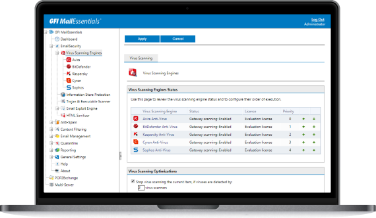
GFI MailSecurity uses multiple antivirus engines to scan inbound email.
Using multiple scanners drastically reduces the average time required to obtain the latest virus signature, enabling a faster response to combat the latest threats. Each antivirus software engine has a different response time to each new virus, depending on where the virus was discovered, and other factors. By using multiple antivirus engines, GFI MailSecurity gives you a much better chance of having the right defense, at the right moment, to combat the latest attack. Since each engine has its own heuristics and detection methods, each one brings its own strength to your email environment for detecting a particular virus and its variants. Multiple antivirus engines, as provided by GFI MailSecurity, mean better virus protection.
The GFI MailSecurity Trojan and Executable scanner detects unknown malicious executables by analyzing what an executable does.
A trojan (or malicious executable) is software that enters the victim’s computer undetected, granting an attacker unrestricted access to the data stored there. The Trojan and Executable Scanner takes the approach of using built-in intelligence to rate an executable's risk level. It does this by disassembling the executable, detecting in real time what it might do and comparing its actions to a database of malicious actions. The scanner then quarantines any executables that perform suspicious activities, such as accessing a modem, making network connections or accessing the address book.
Norman Virus Control is an industrial strength antivirus engine that has received the 100% Virus Bulletin award over 30 times running. BitDefender is a very fast and flexible award-winning antivirus engine that can recognize and scan a strikingly wide range of formats. GFI MailSecurity automatically checks and updates the Norman Virus Control and BitDefender definition files as they become available. The GFI MailSecurity price includes updates for one year.
To achieve even greater security, you can add the Kaspersky, McAfee and/or AVG antivirus engines as a third, fourth or fifth antivirus.
Kaspersky Antivirus is ICSA-certified and is well known for the depth of its object scanning; for the high rate at which new virus signatures are released; and for its unique heuristic technology effectively neutralizing unknown viruses. Another engine, McAfee, is particularly strong at detecting non-virus attacks such as rogue ActiveX controls. You can also get AVG from GRISOFT. With 15 years of experience in the antivirus industry, GRISOFT employs various experts in antivirus software, specifically in the areas of virus analysis and detection.
Combating new malware is a major challenge for administrators.
One of the best ways to detect the most recent malware, for which definitions have yet to be released, is to run it in a Sandbox. GFI MailSecurity features Norman Sandbox, a technology which makes use of an emulated environment to analyze the behavior of suspicious files in cases where signature-based analysis falls short. Additionally, for those also using the optional AVG antivirus, GFI MailSecurity uses the AVG LinkScanner to analyze hyperlinks in email bodies to determine whether they point to malicious content. The AVG LinkScanner can also be configured to scan the links’ destination pages.
The advent of HTML email has made it possible for hackers and virus attackers to trigger commands by embedding them in the HTML.
GFI MailSecurity checks for script code in the body of an email message disabling these commands before sending the cleaned email on. GFI MailSecurity protects you from malicious HTML email using our patented process, safeguarding you from HTML viruses and attacks launched via HTML email.
GFI's Email Exploit Engine builds on our cutting-edge research into email exploits, safeguarding you from any email virus or attack that uses known application or operating system exploits.
For example, GFI MailSecurity would have protected you against the Nimda and Klez viruses when they first emerged, without requiring an antivirus update, because they used known exploits.
GFI MailSecurity's Trojan and Executable Scanner can recognize malicious files including spyware and adware.
GFI MailSecurity can also detect spyware transmitted by email with the Kaspersky antivirus engine (optional) which incorporates a dedicated spyware and adware definition file that has an extensive database of known spyware, trojans and adware.
GFI MailSecurity's attachment checking rules enable administrators to quarantine attachments based on user and file type.
For example, all executable attachments can be quarantined for administrator review before they are distributed to the user. GFI MailSecurity will scan for information leaks such as an employee emailing a database. You can also choose to delete attachments like .mp3 or .mpg files. The administrator can configure GFI MailSecurity to block certain attachments only if they exceed a specific size and to strip suspicious attachments from the email before sending it to the user.
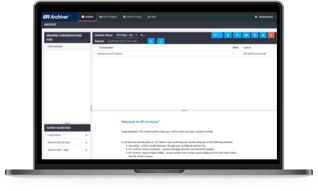
GFI MailSecurity has a dashboard that gives access to various counters and important logs, giving the administrator total control of the email scanning system, resulting in improved product manageability.
From trend reports for management (ROI) to daily drill-down reports for technical staff, the GFI MailSecurity ReportPack provides you with a comprehensive and easy-to-view understanding of your security patterns. Full automation and custom scheduling provide install-it-and-forget-it-functionality. The GFI MailSecurity ReportPack offers several default and customizable reports that can be prepared on an hourly, daily, weekly or monthly basis including:
Using GFI MailSecurity's powerful content policy rules engine, you can configure for policy rules based on user and keywords.
We not only help you to quarantine potentially dangerous material for administrator approval, but also help you to scan for offensive content.
GFI MailSecurity enables you to configure a series of search folders (similar to MS Outlook) within the ‘Quarantine Store’, permitting you to manage quarantined emails better and faster.
For example, you can set up a folder for emails that were quarantined by virus checking and another for emails quarantined by attachment checking for a particular user, thus allowing you to prioritize. For example, it may be more important in your environment to examine the attachment checking folder first, allowing you to quickly approve and forward those emails that are appropriate.
GFI MailSecurity takes advantage of the power of RSS (Really Simple Syndication) feeds to simplify your work as an administrator in keeping an eye on your email quarantine store.
Through RSS feeds, you will be informed of all new quarantined objects, eliminating the need to log onto the quarantine store to check for new updates manually.
Our web-based configuration allows you to configure and monitor the product as well as to manage quarantined emails remotely from any computer with a browser. That means that you can monitor and manage GFI MailSecurity from anywhere in the world.
GFI MailSecurity provides several options for moderating quarantined email.
The web-based moderator allows you to approve and reject emails from anywhere on your network. We will also forward quarantined emails to an email address of your choosing, enabling you to use a public folder to distribute the work of accepting and rejecting email to multiple administrators.
GFI MailSecurity lets you conduct searches within quarantined email in a number of useful ways.
For example, you can search among in or outbound email to or from a particular user. Searches can be carried out based on sender, recipient, the reason for quarantine and more, freeing the administrator from the tedious task of sifting through a folder full of email, one-by-one.
When an email is quarantined, GFI MailSecurity gives a full report detailing all threats identified per email.
GFI MailSecurity's companion product, GFI MailEssentials for Exchange/SMTP offers spam protection at server level, eliminating the need to install and update anti-spam software on each desktop.
GFI MailEssentials includes a number of effective tools to virtually eliminate spam from your network. It also provides disclaimers, Internet email reporting, server-based auto replies and POP3 downloading. GFI MailEssentials integrates seamlessly with GFI MailSecurity and both can be purchased separately or as a bundle in the GFI MailDefense Suite.
Organizations that are currently using or plan to use virtualization on their network can still install and use a range of GFI products with confidence.
GFI MailSecurity supports and runs on the most common virtualization technologies in use, namely VMware, Microsoft Virtual Server and Microsoft Hyper-V.
![]()
Leading companies all over the world have chosen GFI MailSecurity.
Click here to view case studies and testimonials
GFI MailSecurity places second runner-up in the em...
GFI MailSecurity places second runner-up in the email antivirus category of the WindowSecurity.com Readers’ Choice Awards.
WindowSecurity.com - May, 2011
GFI MailSecurity has won the Content Security Solution of the Year award at the Computing Security Awards. These awards recognise the solutions and companies that have most impressed those charged with keeping their organisations secure.
GFI Software, an HP alliance partner, has been cer...
GFI Software, an HP alliance partner, has been certified HP Converged Infrastructure Ready - demonstrating GFI’s expertise in delivering solutions that are Converged Infrastructure compliant.
"A Mature product and a must have for all organiza...
"A Mature product and a must have for all organization’s running MS Exchange. GFI MailSecurity is a solid product, well positioned to provide content scanning and anti-malware protection for email, with an easy to use administrative interface and low overhead. It offers good reporting out of the box, and with the optional reporting pack, it can provide any type of information management could desire." - msexchangeguru.com
"These products are well worth looking at for prot...
"These products are well worth looking at for protection of your email infrastructure. It's not too often a tool meets ALL my requirements, well done." - Reviewboard Magazine
GFI MailSecurity 10 is given 4 stars in a review in SC Magazine. The reviewer says the product has strong antivirus features and integrates with common mail servers.
- SC Magazine
In a review on Messagingtalk.com, MVP Shaji Firoz takes GFI MailSecurity through its paces and finds he prefers the product because of its ease of use. He said the installation, configuration and administration are straightforward. The product also requires little maintenance and offers multiple layers of defense. Other benefits include “remote management using Web based console” and the fact that “GFI MailSecurity is affordable in the market and maintaining the subscription cost is relatively low”. Concluding he said: “Honestly, I don’t see any cons in terms of features and performance.” - messagingtalk.org
InfoWorld's Test Center Report recommends that: "V...
InfoWorld's Test Center Report recommends that: "Viruses should be killed before they ever get to the desktop with tools such as GFI MailSecurity, which performs content monitoring and protects Exchange and SMTP email against viruses, malicious code, and worms at the server level." - InfoWorld