




![]()
Email security and anti-spam software for SMBs
Block email-borne viruses at server level
Eliminate over 99% of spam and phishing emails
Add multiple anti-spam and antivirus filters to your mail server
![]()
Block email-borne viruses at server level
Eliminate over 99% of spam and phishing emails
Add multiple anti-spam and antivirus filters to your mail server
We have the answer:
UnifiedProtection Edition: Comprehensive server-based solution that protects your network against spam, viruses and other email-borne threats. It delivers a spam capture rate of over 99%, minimal false positives and up to five antivirus engines.
Anti-spam Edition: Server-based anti-spam and anti-phishing.
EmailSecurity Edition: Multi-layered security against viruses and other email malware.
![]()
GFI MailEssentials is a VBSpam-certified anti-spam solution which protects your users from loss of productivity by implementing multiple anti-spam engines for very high spam blocking with minimal false positives.
By combining SpamRazer filtering, greylisting, IP reputation filtering, Bayesian filtering and other advanced anti-spam technologies, it provides a spam capture rate of over 99%. GFI MailEssentials also has an enviable low rate of false positives, ensuring the safe delivery of important emails.
The GFI MailEssentials anti-phishing module detects and blocks threats posed by phishing emails by comparing the content of the spam with a constantly updated database of phishing URLs, to ensure that all the latest phishing emails are captured.
As extra protection, it also checks for typical phishing keywords in every email sent to your organization.
Whitelists enable you to ensure that email from particular senders or domains are never flagged as spam, permitting more stringent anti-spam rules.
GFI MailEssentials includes patent-pending automatic whitelist functionality, which adds outgoing mail recipients to your whitelist. This greatly reduces false positives without any need for additional administration. Whitelist entries can also be based on domain names, email addresses and keywords.
GFI MailEssentials allows users to add senders to the email whitelist or blocklist simply by dragging and dropping an email from them to a public folder.
This gives users more control and reduces administration. Administrators can control access to this feature through the use of public folder security.
GFI MailEssentials can be configured to quarantine spam emails and send a regular report (or digest) to end users listing what spam was blocked for them and allowing them to manually release emails which they want to receive from the quarantine. End users can also access their own spam quarantine at any time through a web based interface.
The product can be configured to automatically delete emails from the spam quarantine after a pre-defined period of time.
All this allows for end users to manage their own spam quarantine without needing to have an administrator manually review everyone’s spam.
The New Senders feature provides users with an instant view of emails sent from people with whom they have not had previous email contact, thereby helping users to better organize emails in their inbox.
If GFI MailEssentials does not identify an email as spam and its sender is not on the whitelist, then the New Senders module can move that email to a user's subfolder, for example, Inbox – New Senders.
GFI MailEssentials gives you the flexibility to choose what to do with spam.
You can delete it, move it to a folder on disk, forward the spam mail to a mailbox or public folder for review, quarantine it or send it to individual customizable folders (for example, a junk mail folder) in the end-users' inboxes. You can also select multiple actions as required. This allows you to sort spam and to easily review mail that has been flagged as spam.
Driven by the financial gain in selling fake products such as pharmaceuticals and watches, and in the delivery of malware targeting credit card and other sensitive information, spammers go to great lengths to ensure their junk emails get to their destination. Among others, they leverage large botnet armies of zombie machines to send billions of emails, and utilize a variety of tricks such as emails with image, PDF, ZIP and Word or Excel attachments, also known as attachment spam.
The various spam filtering technologies in GFI MailEssentials are designed to make spammers’ lives harder while giving you peace of mind. SPF blocks spoofed emails; Greylisting blocks emails sent with non-RFC compliant techniques used by spammers; Directory Harvest blocks email sent using random and exhaustive email address generation techniques; and DNSBLs utilize a wealth of information gathered from distributed community data collection techniques to fend off botnet spamming. These technologies, when combined with others such as SpamRazer and Bayesian filtering, make it much harder for attachment spam to make it through. It’s a whole arsenal of spam fighting weapons at your disposal!
GFI MailEssentials is server-based and installs on the mail server or at the gateway, eliminating the deployment and administrative hassle of desktop-based anti-spam and anti-phishing products. A server-side solution will prevent your server message stores from filling up with spam and eliminate the need to train your users on the creation and update of anti-spam rules.
SpamRazer is a powerful anti-spam engine that has been designed for ease-of-use. Due to frequent updates, SpamRazer needs no tweaking to be effective in filtering the latest spam attacks. Not only will administrators benefit from out-of-the-box filtering but they will also gain protection from each new attack without the need to tweak GFI MailEssentials.
Greylisting is an anti-spam technique used to identify spam emails originating from non-RFC compliant mail servers (which are often utilized by spammers).
For each new SMTP transmission, GFI MailEssentials records the sender, recipient and sending mail server’s IP address (known as a “triplet”) and rejects the email with a temporary failure message. Compliant email servers will try to resend the message after a few minutes – this causes their triplet to be confirmed and connections with the same triplet are no longer rejected. Non-compliant mail servers do not try to resend the message.
As most of today’s spammers spoof email addresses, it is important to be able to check whether an email is genuine or if it has been sent from a forged sending address.
This can be done via the Sender Policy Framework (SPF), which allows users to test whether a particular email originates from its claimed source. The GFI MailEssentials SPF module automatically checks whether the mail from a particular company was actually sent by its registered mail servers.
GFI MailEssentials supports DNS blocklists (sometimes also known as DNS real-time blocklists, DNSRBLs), which are databases of addresses of computers and networks linked to spamming. If the sending mail server is on one of the configured lists, an email is marked as spam. GFI MailEssentials supports popular third-party DNS blocklists, such as SpamHaus and Spamcop, and also enables administrators to configure custom DNS blocklists.
Bayesian filtering, which uses a mathematical approach based on known spam and ham (legitimate email), is an effective way to catch spam.
GFI’s Bayesian filter has a tremendous advantage over other spam solutions that only check for keywords or rely on downloading signatures of known spam as it uses an advanced mathematical formula coupled with a dataset that is custom-made for your installation: spam data is continuously updated by GFI and is automatically downloaded by GFI MailEssentials, whereas the ham data is automatically collected from your own outbound mail. This means that the Bayesian filter is constantly learning new spam tricks; spammers cannot circumvent the dataset used. This results in an exceptionally high spam detection rate, after the required automated two-week learning period. In short, Bayesian filtering has the following advantages:
GFI MailEssentials downloads regular anti-spam updates ensuring that it recognizes the latest spam and spamming techniques. These are the result of GFI’s own research as well as cooperation with other spam collection and analysis organizations.
You can configure which method of capturing spam is to be given priority and create your own order in which spam filters are to be applied. For example, an administrator can select that the whitelisting anti-spam feature is applied first to all incoming mail, then Bayesian filtering, and so on.
Administrators can select to log occurrences of blocked or whitelisted email, and choose to start a new log file whenever a pre-defined period of time elapses or the log file reaches a specific size on disk.
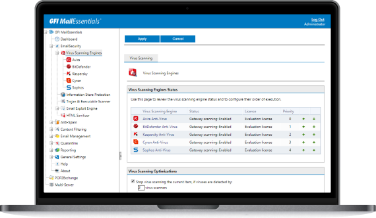
GFI MailEssentials uses multiple antivirus engines to scan inbound email. This drastically reduces the average time required to obtain the latest virus signature, enabling a faster response to combat the latest threats. Each antivirus software engine has a different response time to each new virus, depending on where the virus was discovered, and other factors.
By using multiple antivirus engines, GFI MailEssentials gives you a much better chance of having the right defense, at the right moment, to combat the latest attack. As each engine has its own heuristics and detection methods, each one brings its own strength to your email environment for detecting a particular virus and its variants. Multiple antivirus engines, as provided by GFI MailEssentials, mean better virus protection.
GFI MailEssentials ships with the GFI VIPRE and BitDefender antivirus engines.
VIPRE utilizes an advanced technology stack to perform high-speed threat scanning to analyze large volumes of information for malware threats in a short period of time with limited performance impact on a user’s system. Its built-in MX-V malware analysis technology rapidly analyzes potential malware by observing its behavior in a virtual environment for zero-day threat detection.
BitDefender is a very fast and flexible award-winning antivirus engine that can recognize and scan a strikingly wide range of formats.
GFI MailEssentials automatically checks and updates the VIPRE and BitDefender definition files as they become available. The GFI MailEssentials price includes updates for one year.
GFI's Email Exploit Engine builds on our research into email exploits, safeguarding you from attacks which specifically target vulnerabilities which can utilize email as a vector. This technology is specifically built from the ground up to protect against email based attacks, as opposed to various email protection technologies on the market which were originally built to protect against file based or other endpoint based attacks.
The GFI MailEssentials Trojan and Executable Scanner detects unknown malicious executables by analyzing what an executable does. A Trojan is software which offers some functionality which might actually be useful to a user, while performing other malicious actions under the hood such as granting an attacker unrestricted access to the data stored on the victim’s computer. The Trojan and Executable Scanner uses built-in intelligence to rate an executable's risk level. It does this by disassembling the executable, detecting in real time what it might do and comparing its actions to a database of malicious actions. The scanner then quarantines any executables that perform suspicious activities, such as making network connections or accessing the address book.
HTML email makes it possible for hackers and virus attackers to trigger commands by embedding them in HTML. GFI MailEssentials checks for script code in the body of an email message disabling these commands before sending the cleaned email on.
GFI MailEssentials protects you from malicious HTML email using a patented process to safeguard you from viruses and other attacks launched via HTML email.
GFI MailEssentials protects you against spyware through its unique battery of email protection technologies, including multiple antivirus engines, as well as other technologies built specifically to protect against email based attacks, such as an email exploit engine, trojan and executable scanner, and HTML sanitization.
GFI MailEssentials can also detect spyware transmitted by email with the (optional) Kaspersky antivirus engine, which incorporates a dedicated spyware and adware definition file that has an extensive database of known spyware, trojans and adware.
GFI MailEssentials gives you the flexibility to choose what to do with malware.
You can delete it, move it to a folder on disk, quarantine it, or forward it to an email address of your choosing, enabling you to use a public folder to distribute the work of accepting and rejecting email to multiple administrators.
GFI MailEssentials gives administrators the option to quarantine emails to a malware quarantine to which access can be controlled. Flexible options for managing this quarantine include web based access, which allows you to approve and reject emails from anywhere, as well as email based quarantine access forms and RSS feeds with links for reviewing, approving or deleting quarantined emails. The latter simplifies your work as an administrator in keeping an eye on your email quarantine store by eliminating the need to log on to the Quarantine Store to check for new quarantined emails manually.
To achieve even greater security, you can add the McAfee, Kaspersky and/or Norman antivirus engines as a third, fourth or fifth antivirus. McAfee is particularly strong at detecting non-virus attacks such as rogue ActiveX controls; Kaspersky is well known for its heuristic technology and the high rate at which new virus signatures are released; and Norman is an industrial-strength antivirus engine that has received the 100% Virus Bulletin award over 30 times running.
Combating new malware is a major challenge for administrators. One of the best ways to detect the most recent malware, for which definitions have yet to be released, is to run it in a sandbox. With the optional Norman antivirus addition, GFI MailEssentials features Norman Sandbox, a technology which makes use of an emulated environment to analyze the behavior of suspicious files in cases where other types of analyses fall short.
Using the powerful GFI MailEssentials content policy rules engine, you can configure user based or group based policy rules based on keywords, regular expressions, attachments and email headers. This not only helps you to quarantine potentially dangerous material for administrator approval, but also helps you to scan for offensive content and safeguard against malicious or accidental email data leaks.
GFI MailEssentials enables you to configure a search folders (similar to Microsoft Outlook) within its Quarantine Store, permitting you to manage quarantined emails better and faster.
For example, you can set up a folder for emails that were quarantined by virus checking and another for emails quarantined by attachment checking for a particular user, thus allowing you to prioritize. It may be more important in your environment to examine the attachment checking folder first, allowing you to quickly approve and forward those emails as appropriate.
GFI MailEssentials lets you conduct searches within quarantined email in a number of useful ways. For example, you can search among incoming or outbound email to or from a particular user. Searches can be carried out based on sender, recipient, reason for quarantining the email, and more, freeing the administrator from the tedious task of sifting through a folder full of email, one by one.
GFI MailEssentials features a web based configuration and management console from where one can manage all anti-spam and email security functionality in the product, including its spam and malware quarantine.
The console includes a real-time dashboard that gives administrators a graphic view of the software’s status as well as the server’s email flow. Information shown on the dashboard includes: status of key GFI MailEssentials services, email flow statistics, blocked spam and malware, POP2Exchange logging and email processing results which can be filtered by sender, recipient, subject, and more.
GFI MailEssentials ships with integrated reporting capabilities which form part of its web-based user interface, enabling administrators to generate reports on the emails being sent and received by their organization. The reports are customizable through various options included in the reporting component.
Keyword checking functionality in GFI MailEssentials can be used to scan emails for keywords with a variety of purposes. You could scan emails for common inappropriate keywords of a vulgar, racial, sexual or otherwise offensive nature, for example. You could also utilize it as a further weapon against spam by configuring it to block common spam keywords.
Attachment checking functionality can be used to scan emails for attachments, ensuring that sent and received attachments are of a file type which is accepted by organizational policy, and utilizing real file type detection technology to ensure that techniques such as file extension renaming are not utilized to bypass checks. You could choose to block all incoming emails with potentially malicious attachment types, for example, or block bandwidth and productivity wasters such as .mp3 (audio) and .mpg (video) files.
In all cases, rules can be defined on a user or group basis, exclusions can be configured, and actions which can be triggered include forwarding or quarantining for administrator review, or stripping of blocked content before forwarding to the intended recipient.
Advanced user-based filtering rules can be used for flexible and granular filtering on any part of the email message, including message headers, subject, body, attachment name and attachment content. Administrators can use one of the pre-defined content filtering rules to block emails with credit card numbers or social security numbers.
Advanced users can also create advanced filtering rules matching a regular expression (regex), allowing them to block emails based on patterns which they define, which is much more powerful than simple keyword checking.
Combine this functionality with keyword and attachment checking to safeguard yourself against malicious or accidental email information leaks.
You can use the decompression engine in GFI MailEssentials to scan within a variety of archive types, as well as checking for password protected and corrupted archives, number of files in an archive and their uncompressed size, and recursive archives.
GFI MailEssentials enables you to add disclaimers to the top or bottom of an email. Text and HTML formats are supported.
You can include fields and variables to personalize the disclaimer. You can even create multiple disclaimers and associate them with a user, group or domain.
The POP2Exchange feature in GFI MailEssentials offers administrators of organizations which utilize external POP3 email accounts a practical way to receive emails without needing their own dedicated email server.
GFI MailEssentials integrates seamlessly with Microsoft Exchange 2003/2007/2010. It can be installed on the Exchange server and does not require gateway configuration. It also works with Exchange 5.5/2000, Lotus Domino and other popular SMTP servers via the SMTP protocol.
Organizations that are currently using or plan to use virtualization on their network can install and use a range of GFI products with confidence. GFI MailEssentials supports and runs on the most common virtualization technologies in use, namely VMware, Microsoft Virtual Server and Microsoft Hyper-V.
The email monitoring feature enables you to keep a central store of the email communications for a particular person or department by configuring their email to be copied to an email address. These emails can then be stored in an Exchange or Outlook store, also making it possible to search within them.
List servers have traditionally been expensive and difficult to administer, and few integrated with Exchange Server. The GFI MailEssentials List Server offers an easy way to implement an opt-in email discussion list with automated subscribe and unsubscribe. Similarly, it offers email newsletter distribution with equal ease. It integrates with Exchange and can use Microsoft Access or Microsoft SQL Server as the backend for its subscriber list.
Administrators can assign permissions to other users to review quarantined emails, receive updates on quarantined emails via the Quarantine RSS feeds, and generate reports. This can be done directly from the GFI MailEssentials web-based user interface.
All the components of GFI MailEssentials provide full support for Unicode, the industry standard for universal character encoding. GFI MailEssentials can process emails in any language and ensure that all characters are rendered properly after processing.
GFI MailEssentials detects other applications registered with Exchange Server to scan emails using VSAPI and gives the administrator the option to continue with the installation, utilizing Exchange sink or agent technology to scan emails for viruses. GFI MailEssentials Information Store Protection can then be enabled at any time once the third-party VSAPI based product has been un-installed.
GFI MailEssentials recently won a VBSpam award. VBSpam certification is awarded to products that exceed a predefined threshold based on a combination of criteria relating to the products' spam catch rate and false positive rate.
Virus Bulletin - January 2012
GFI MailEssentials for Exchange/SMTP places 2nd runner-up in the anti-spam category of the MSExchange.org Readers’ Choice Awards.
MSExchange.org - June, 2011
GFI MailEssentials, GFI EndPoint Security and GFI MailArchiver are all Finalists in the Computing Security Awards - Computing Security Awards
"These products are well worth looking at for prot...
"These products are well worth looking at for protection of your email infrastructure. It's not too often a tool meets ALL my requirements, well done." - Reviewboard Magazine
"Good Spam Filtering Product that is Trusted and Advised by Professionals" - Cozumpark
MailEssentials from GFI is an excellent anti-spam ...
MailEssentials from GFI is an excellent anti-spam solution for small and medium businesses with in-house information services teams. Flexible configuration of blocking and management technology makes MailEssentials a fit for a variety of spam management approaches, writes Tom Olzak.